
Used by 3,000+ contractors
Take and organize job photos on the go.
Be a pro and capture every job photo and project on the go. All photos, one spot. Get started today.

Free trial
No credit card required
Must have RelayCam™ Features for Peace of Mind
All Job Photos in One Spot

Time and Location stamped Photos
All photos in RelayCam are time and location stamped so you can save your butt and avoid getting the finger pointed at you.

Organize Your Business
Create projects, tag photos, and label projects. So when the time is right, you can instantly find that job info you need. Plus, you avoid a photo clogged personal camera roll.

Visually Communicate with your Team
Never worry about missing important info again. Have your team upload photos of progress in real time. Add notes directly in the app so all team members can see them.
Photos & Video
Every photo, in one place.
Shoot in RelayCam and every photo lands in the project, ready for the office on the web app.
AI Walk & Talk Reports
Walk the job. The report writes itself.
Talk as you shoot. RelayCam turns the walkthrough into a finished report with your photos in the right places.
Share Projects, a live Feed, or Photo Galleries
Send one link. They see every new photo.
Keep everyone in the loop. Text them a live photo feed. It opens in any browser, no app, login or account, and new photos show up on their own.
Markups & Annotations
Show exactly what you mean.
Circle it, point to it, and everyone sees the issue in seconds.
Checklists & Templates
No task gets left behind.
Work through the checklist on site. Anything marked No or rated low lands in Needs Attention on the finished checklist.
Power features
Work smarer with every job. Save time. Do more.
Smart Uploader
Find the job's photos in one tap.
Upload Photos finds the shots you took at the site and files them to the project as one post.
See how it works →Shareable Reports
A clean report, ready to send.
Drop photos into sections, add a line under each, and generate a polished PDF with your logo and cover page.
See how it works →Updates & Daily Logs
Your daily log, written for you.
Tap Create and RelayCam drafts the daily log from the day's work. Review it, check off what's done, and share it.
See how it works →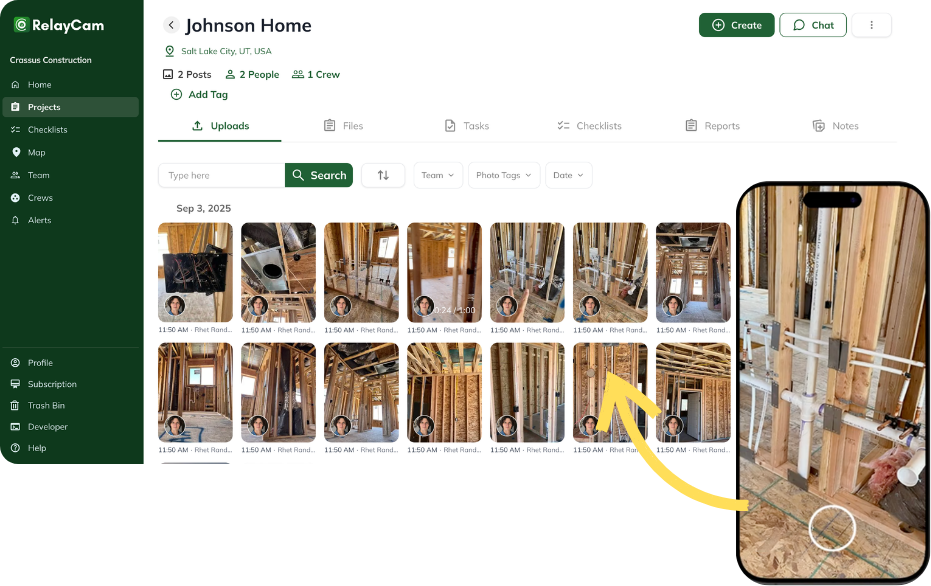
Why people use RelayCam
Document, Organize, and Keep Teams Accountable
Avoid liability by being organized with job photos date and time stamped, organized by job, and keeping your team accountable

Visually Document what you did and didn't do
Visually document with photo/video jobsite so you can avoid blame for damages and communicate with your team and customers.

Improve your teams and permissions
Get organized with photos stored by job and by person. Add different permissions to fit your business.
Yeah, WE'LL Integrate WITH THAT
Relay your info with our API's

ProLine
Buildertrend
roofr
How Relaycam™ works
Start using RelayCam in 3 steps
Download and create an account, invite your team, and start uploading content. You could be using it in 1 minute from now. Give it a try.
Step

Download RelayCam App and Create Account
Download RelayCam on IOS or Android store, and create an account. It takes less than 30 seconds.
Step

Invite Your Team & Create Projects
Invite your team with the invite link in app and start creating projects.
Step

Take Photos, Communicate and See Progress Real Time
Now you can take or upload photos/videos to your projects in RelayCam, message your team, and, most important, sleep a little better at night knowing your organized and have all your job content in one spot.
If you don't thank us, we think maybe your team will
If you don't thank us, we think maybe your team will
Blog
The latest from our blog




Wanna chat or demo?
Questions? Concerns? Requests? Talk to a real human

Watch a RelayCam demo now
Short on time, busy, got jobs to do? See how RelayCam works now!
See RelayCam in action
Start your free trial now by clicking the button below